
14 Terrible LinkedIn Mistakes You're Making
There are some things you just shouldn't do on LinkedIn.
Kim Brown is an assistant director for Syracuse University's Career Services department. She spends a good portion of her day looking over LinkedIn profiles for job seekers and students. She makes sure candidates are putting their best feet forward on LinkedIn.
Here are the most common mistakes Brown sees job seekers make on LinkedIn.
1. Your profile is full of typos

Brown says she's seen people spell a lot of things wrong on LinkedIn. She's seen typos in company names, job titles, and even in the user's name.
Unfortunately, LinkedIn doesn't have a built-in spell checker. But your Web browser might. Safari, Chrome, and Firefox underline misspellings in red. Bottom line, whatever you use: Be as careful on LinkedIn as you would be with a paper resume.
2. You have no picture in your profile
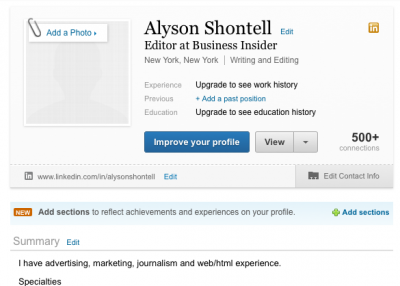
Adding a picture to your LinkedIn profile can make a world of difference to a recruiter. Studies have shown that profiles with pictures are much more likely to get clicked on LinkedIn than those without.
TheLadders conducted a study and found that recruiters spend more time examining a LinkedIn user's picture than actually reviewing the person's qualifications.
Worse, if a picture isn't included on a profile, people tend to assume it's because the person is ugly, says Miriam Salpeter at U.S. News & World Report.
Help yourself out and include a photo.
3. You have a profile picture, but it's a photo of you and your significant other

Do not get LinkedIn and Facebook confused, says Brown. Facebook is for personal pictures, LinkedIn is for professional ones.
Brown also says she sees a lot of people link to their Facebook profiles from their LinkedIn pages. Don't do this. It's best to keep the two profiles separate.
4. You haven't put any thought into your profile title

Brown says she sees a lot of people simply put "Student at Syracuse University" as their lead LinkedIn job title. She also sees a lot of professionals who are looking for jobs with old titles as headlines.
"If you're a job seeker and you have a [vague or outdated] title, I have no idea you're looking for work," says Brown.
Instead, it's better for a student to call themselves an "Advertising Major at Syracuse University" or a job seeker to write, "Experienced Advertising Professional." Always be honest in your headlines, even if you're currently unemployed.
5. You're not reaching out to people through LinkedIn Groups

It's a little strange to message people you don't know on LinkedIn. But if you do choose to message a stranger, try it first from a group you share in common. This helps break the ice, says Brown.
For example, if you're a Syracuse University alumnus, message a fellow Syracuse person from the Alumni Network before sending a blind InMail.
6. You're not personalizing LinkedIn connection requests

When you connect to someone for the first time on LinkedIn, don't just use the generic message option, "I'd like to add you to my professional network on LinkedIn."
Take a few moments to write something personalized, says Brown. It will make the recipient more open to your request and the message feel less spammy.
Also, never lie about how you know the person. Lying is almost a guaranteed way to kill your chances at connecting.
7. You're contacting people from LinkedIn on your phone

LinkedIn's mobile app lets you connect to people with a click—but you can't customize the message.
People will say to me, "Well, I didn't personalize my message because I couldn't on my phone," says Brown. "It's not an excuse. Get on your computer and connect that way."
You also run a greater risk of typos on your phone. It's always best to conduct the bulk of your LinkedIn activity from your computer, where you have all the features available.
8. You haven't created a unique LinkedIn URL, or Web address

"The head of business development for a big company contacted me, and he had his LinkedIn profile link in his signature," says Brown. "It was [Joe]-[Smith]-8346974. Who would think [all those numbers] look okay? It looks terrible. Definitely customize your URL."
To customize your URL, select "Settings" in the drop down under your name on the top right corner of your LinkedIn home page. Then choose Public Profile Settings, and scroll down to "Your Public Profile URL." There you can customize the link. Try to get as close to your first and last name as possible. Avoid cutesy nicknames or usernames.
9. You never bothered to fill out a summary

Filling out a summary of your LinkedIn profile is crucial if you want to pop up in search results.
"The summary is the most important part," says Brown. "Having search terms and key words in your summary that are related to the job you're doing or want to do is going to make you more likely to be found by the recruiters and hiring managers who are searching LinkedIn for talent."
10. When stalking other people on LinkedIn, you don't make yourself anonymous

"If you're job seeking and you're looking at the same person's profile 59 times in a two-week period, you should probably make yourself anonymous," says Brown.
Any LinkedIn user can see who's viewed their profile recently, but if you limit your public profile settings, less of your information will be revealed to the person you checked out on LinkedIn. The tradeoff: You won't be able to see who's visiting your profile, either.
11. You haven't broken your profile out into sections

A lot of profiles are just one lonnnggg page. But LinkedIn offers a "section" option, so you can break your resume into different parts, highlighting certain jobs and making it easier for others to scan.
For example, rather than listing every job and membership under "Experience," you can break it out into sections such as ""Volunteering," "Certifications," or "Organizations."
12. You list "skills" that LinkedIn doesn't recognize

There are a lot of skills LinkedIn recognizes, but if you write something obscure, it doesn't do you much good.
When you start typing a skill on your LinkedIn profile, make sure it appears in the dropdown menu. If it doesn't, it may be spelled wrong, or it's not a frequently searched item, which won't help your resume get found by recruiters.
Stick to the thousands of skills LinkedIn already has in the system and your profile will pop up more often in search results.
13. You don't have (credible) recommendations

Brown says it's important to have recommendations on your LinkedIn profile. But not just any old recommendation—it should come from someone who's reputable and it should speak to your specific qualifications.
"A lot of times recommendations are really generic," says Brown. "Such as, 'Alyson would be an amazing asset to your company because she is a hard worker and a wonderful addition to our office.' Well, great. How about something more detailed, like about that time you worked on a specific project together?"
Make sure the recommendation someone writes for you isn't applicable to every other candidate.
14. You're not using advanced search tools or the Companies tab when hunting for a job

If you use the advanced search tab, you're much more likely to turn up relevant career opportunities. Instead of just searching by the name of the company or person, you can search by keyword, industry, location, and more.
Also, the Companies tab shows you which companies currently have job openings. Click on the Companies tab at the top of your LinkedIn page, then click the second tab, "Search Companies." Then you can search by relevance, or by an advanced keyword search.
It's much more efficient than using the broad job-search feature on LinkedIn.
